

 March 11, 2026
| By Lena Tarhuni, Senior Product Manager
March 11, 2026
| By Lena Tarhuni, Senior Product Manager
We’re simplifying the meet experience in the Teams Free desktop experience by bringing meeting actions together in one focused place.
The Meet app is now the primary home for calls and meetings, making it easier to schedule, manage, and join without switching between different parts of the app. From planning ahead to jumping into a call, the Meet app keeps your meeting workflow straightforward and easy to follow. This experience is built to reduce unnecessary navigation between two surfaces, meet and calendar.
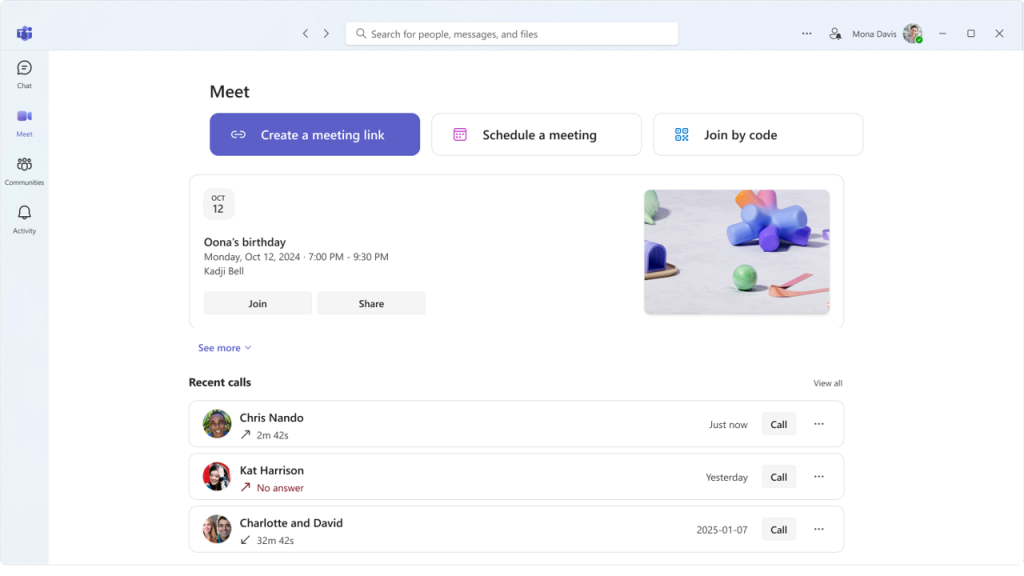
A more focused meeting experience:
With this update, the Meet app brings together the core things people come to Teams Free for:
- Scheduling meetings
- Managing upcoming meetings
- Joining meetings quickly
- Starting calls
- And, in the future, much more including improvements to scheduling experiences
Teams Free continues to evolve toward a more streamlined experience, and we’re excited for Teams Insiders to try it out and share feedback as we refine what comes next.
You share, we listen.
We are always grateful to receive your feedback and suggestions to make Teams better.
- Report bugs and glitches by sending us relevant feedback using the in-app form. Please include diagnostic logs and screenshots to help us to investigate your issue. Learn more how to send feedback or suggest a feature in Teams Free
- If you have suggestions for new features or changes to the existing ones, you can vote and submit ideas on Microsoft Teams Free Feedback Portal.
- In Teams Insider Community you can share feedback and engage directly with the product team. You can also join regular calls to hear about upcoming improvements and more. Learn more and join Teams Insider Community